Friday, June 29, 2007

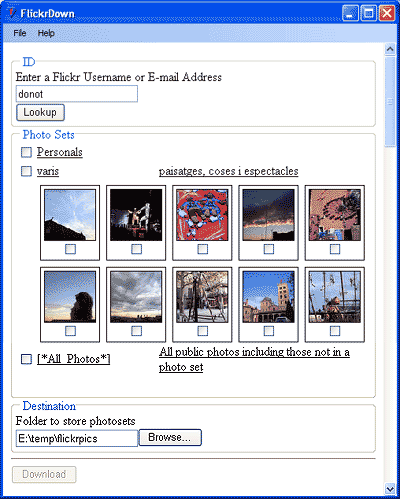
Flickrdown - Batch Download Flickr Photos


OK. I got an email from Yahoo today telling me I need to move (actually Yahoo does it for you) my pictures from Yahoo Photo to somewhere else and Flickr of course is an option (and the one I chose).

Well I stopped using both Yahoo Photo and Flickr after I starting using Google's Picasa and the Picasa Web Albums. The point being I wanted to move my photos on Yahoo Photo to Picasa. I needed to download all of my photos, add them to Picasa, and then decide if I wanted to post these to the web album.

I searched both Yahoo Answers and Google for ways to batch download files from either Yahoo Photo or Flickr. I found it! It is called Flickrdown by www.Greggman.com, you can get it here, and it works for Flickr. It is both easy to install and to use. I wonder if can make one for Picasa's Web Album? :)

HTC TouchFlo - iPhone (or iPhoneness) on the HTC Wizard

So the bad ass developers at XDA-Developers are porting the TouchFlo interface to the HTC Wizard a.k.a. the MDA. It is now in Beta 2b and you can read the forum post here and decide if you are brave enough to flash your MDA.

Check out the video to see TouchFlo in action (HTC Touch).


Save on your energy bills!

I just read a cool article on what I would think would be an easy no hassle way to save money on energy bills. I think it is a win-win situation for the consumers and power producers. Basically update the lame electric meter so it can record when energy is being used and the power companies can charge different rates for power at different times of the day (peak and off-peak).

Everyone would have a monetary incentive to use energy at non-peak times. Here is the article. This is technology at its best.

Wednesday, June 20, 2007

MDA with Windows Mobile 6


Wooohooo my MDA now has Windows Mobile 6 installed!!! Go here to do it yourself (not for the faint of heart). The (for me) best thing about it is power management. My F'n battery would die within 6 hours w/o any real usage and would never sit overnight without completely draining the battery.

Now, it's great. I left my MDA unplugged (with a 100% charge) ALL NIGHT and still had 78% battery power left in the morning. It could never do that before.

After following all of the instructions, in addition to the battery life, you get cool applications like Pocket Screen Capture which I used for the above image.

Under the settings --> system tab, there is an application that is called "X-button" that you can use to actually shut down the apps you are using, by tapping on the "x" button (or tap and hold down, depending on your settins).

Another application I fell in love with is the Audio Manager. It is just a very cool interface for playing your music on you MDA. The interface reminds me of the Zen Vision M player. In addition to letting you find and listen to you music easier and faster, you can hold your stylus down on a song and open the context menu and then choose the song as your ring tone... SWEET!

Anyway, if you are brave enough, follow the instructions METICULOUSLY and you too will be wowed by Windows Mobile 6.

Wednesday, June 13, 2007

ASP.NET 2.0 ReportViewer :: Continued...

I have one report viewer wired to two different local reports and users can select the report from a dropdownlist. Here's the code to show the correct report:

protected void DropDownList1_SelectedIndexChanged(object sender, EventArgs e)
{
// remove previous report viewer if it exists
if (Panel1.Controls.Count > 0)
{
Panel1.Controls.Clear();
}

// create new instance of reportviewer to get around lame bug
ReportViewer rv = new ReportViewer();
ReportDataSource rds = new ReportDataSource("dsCustodians_Custodian", this.objDSRptCustodians);
rv.LocalReport.DataSources.Add(rds);
rv.Width = new Unit("100%");
rv.Height = new Unit("400px");

// set the reportpath dynamically
if (this.DropDownList1.SelectedValue == "Custodians")
{
rv.LocalReport.ReportPath = Server.MapPath("rpt_GroupedByCustodians.rdlc");
}
else if (this.DropDownList1.SelectedValue == "Departments")
{
rv.LocalReport.ReportPath = Server.MapPath("rpt_GroupedByDepartment.rdlc");
}

// add the dynamically called report to the panel
Panel1.Controls.Add(rv);
}


-Eurlist.thesol.com

Tuesday, June 12, 2007

ASP.NET 2.0 ReportViewer :: Failed to enable constraints

I'm using the ASP.NET 2.0 ReportViewer in local mode for the first time (and it ROX). Here are two excellent tutorials:
After you get everything set up and are running the tutorials, you may get this error message:

An error has occurred during report processing.
Exception has been thrown by the target of an invocation.
Failed to enable constraints. One or more rows contain values violating non-null, unique, or foreign-key constraints.


You can go here for the solution to this.

One last piece of code that will save you from a migraine :)

this.ReportViewer1.LocalReport.Refresh();

Good Luck!

-Eurlist.thesol.com